My apologies to Tom Siddell for stealing your joke for my post title.
Sorry to say there's yet again nothing to show this week. I seem to be in a bit of a rut. I think it'd probably be a good idea for me to set aside large-scale terrain generation for a while so I can make some progress.
I honestly can't really think of anything else to write about at the moment. I might update this post if I get an idea later today, but no promises.
Tuesday, March 25, 2014

Tuesday, March 18, 2014
It's a Small World After All
I'm still working on large-scale terrain. I decided to try a hexagonal grid rather than a square one because it seemed more natural. Plus, it avoided the awkward question of whether or not I should have water flow diagonally. Here's a screenshot. The terrain itself looks more natural, but lakes and rivers no longer form quite as easily, which I have to work on.

Here's a screenshot showing the hexagonal cells. Each vertex is one cell. The lines show the connections between them.

One thing that's changed is that the different layers can now mix together to a degree. I'm not sure if this was a good move. It's more realistic in some ways, but the results aren't quite as interesting. Feels like two steps forward and one step back. There are still a lot of things I want to add (temperature, humidity, snow and ice, plants, etc), but I'm trying to get the parts I have now working as well as possible before adding more complexity.
Interesting fact: the area I'm simulating is roughly four square kilometers, but this can be scaled up.
Tuesday, March 11, 2014
Building a Legacy
No update this week. I hit a bit of a wall on the project. Then I bought Rogue Legacy and kinda got sucked into that for a few days. I'll try to have something more next week!
Tuesday, March 4, 2014
Large Scale Terrain Generation

This week I worked on large scale terrain generation. The plan is run an environment simulation for some amount of time to create large scale structures (such as lakes, rivers, and mountains). The actual game will then use the large scale features as a guide for more detailed generation.
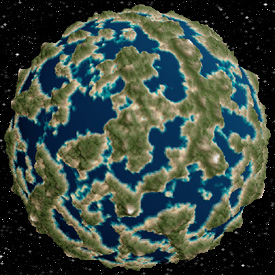
I'm using a different algorithm to generate the elevation. Specifically, I'm using the idea described on this page. I like this algorithm a lot because it's very simple and produces good results. Compare a planet created with Perlin noise vs. the spherical landscape algorithm:
 |
| Using Perlin noise. |
 |
| Using spherical landscape. |
Perlin noise tends to be more uniform resulting in a planet covered in lakes. While this can be overcome by adding multiple noise layers together, there are a lot more variables that need adjusting to get it looking good. With the spherical landscape algorithm, on the other hand, you need only to adjust the number of iterations. It tends to produce more varied results, which look more like oceans and continents.
Currently, the environment simulation works by iterating on several layers of 'fluid'. I use this term loosely because what I'm doing is not at all physically accurate (and I'm applying it to soil and sand in addition to water). The bottom-most layer is rock. Rock doesn't flow at all, but it can be eroded, which results in sand. Sand resists flow more than water, and soil more than sand, which creates flat-lands and beaches. Rain is simulated by evaporating water from every point and redistributing it equally.
The environment simulation is pretty bare bones at the moment, but it's already producing good results. I'll probably continue working to make it better for a few weeks before using it to generate actual game terrain.
Currently, the environment simulation works by iterating on several layers of 'fluid'. I use this term loosely because what I'm doing is not at all physically accurate (and I'm applying it to soil and sand in addition to water). The bottom-most layer is rock. Rock doesn't flow at all, but it can be eroded, which results in sand. Sand resists flow more than water, and soil more than sand, which creates flat-lands and beaches. Rain is simulated by evaporating water from every point and redistributing it equally.
The environment simulation is pretty bare bones at the moment, but it's already producing good results. I'll probably continue working to make it better for a few weeks before using it to generate actual game terrain.
Tuesday, February 25, 2014
Please Save This For Me
I'll come back for you, love, I promise to.
This week I've been working on saving and loading the world as you move through it. Until now, the world has been procedurally generated as needed. You could make changes to the world, but if you left and came back, the terrain would be re-generated.
A simplest way to handle saving and loading is to divide the world into parts and save/load each part to a file. However, this can incur a lot of hidden overhead. File reads/writes are very expensive. They're pretty much the most expensive thing a computer program can do short of accessing the internet.
So I decided to (once again) take a lesson from Minecraft. I originally implemented a format that was more or less identical to the Region file format used by Minecraft. After doing all that work, I suddenly realized that the Region format wouldn't work for me, and there's one important difference between my project and Minecraft that makes this a problem: Minecraft has a fixed height limit.
My project, on the other hand, does not. The game world extends infinitely in all directions, including up and down. The reason this is a problem is because the Region file format stores world chunks in vertical columns. This is fine in Minecraft since moving up or down can never trigger loading/saving. This is not the case in my project. If I used the Region format, I would have to store twice as much data when the player is straddling a vertical boundary.
So I decided to modify the format to suite my needs. Instead of working with columns of the world, I'm working with large cubes. I chose a size that was large enough to take advantage of compression (using run length encoding), but small enough not to incur a huge memory overhead. I ended up settling on 64 x 64 x 64 block areas.
Unfortunately, this change created a problem. In the Region format you're unlikely to get an entire column compressed down to significantly less than 4096 bytes. This number is significant because most modern computers read from hard drives 4096 bytes at a time (it's more efficient to have a few large reads than a lot of small ones). Region stores its data in a way that minimizes the number of reads/writes.
When you store the world as large cubes, you end up having cubes of solid air or rock. After compression, these only take up a few bytes. Basically, this would mean using 4096 bytes for something that requires less than 10. This wouldn't be so bad if these sort of regions were few and far between, but they actually make up the majority of the game world. My solution to this problem was to store multiple small chunks in a single 4096 byte area. Large chunks are still stored the original way. The end result isn't quite as elegant as the Region format, but it did, inadvertently, result is a larger maximum chunk size (255 MiB vs Minecraft's 1).
I finished all the code for this, but I still have to fix a few bugs before I can say it's done.
This week I've been working on saving and loading the world as you move through it. Until now, the world has been procedurally generated as needed. You could make changes to the world, but if you left and came back, the terrain would be re-generated.
A simplest way to handle saving and loading is to divide the world into parts and save/load each part to a file. However, this can incur a lot of hidden overhead. File reads/writes are very expensive. They're pretty much the most expensive thing a computer program can do short of accessing the internet.
So I decided to (once again) take a lesson from Minecraft. I originally implemented a format that was more or less identical to the Region file format used by Minecraft. After doing all that work, I suddenly realized that the Region format wouldn't work for me, and there's one important difference between my project and Minecraft that makes this a problem: Minecraft has a fixed height limit.
My project, on the other hand, does not. The game world extends infinitely in all directions, including up and down. The reason this is a problem is because the Region file format stores world chunks in vertical columns. This is fine in Minecraft since moving up or down can never trigger loading/saving. This is not the case in my project. If I used the Region format, I would have to store twice as much data when the player is straddling a vertical boundary.
So I decided to modify the format to suite my needs. Instead of working with columns of the world, I'm working with large cubes. I chose a size that was large enough to take advantage of compression (using run length encoding), but small enough not to incur a huge memory overhead. I ended up settling on 64 x 64 x 64 block areas.
Unfortunately, this change created a problem. In the Region format you're unlikely to get an entire column compressed down to significantly less than 4096 bytes. This number is significant because most modern computers read from hard drives 4096 bytes at a time (it's more efficient to have a few large reads than a lot of small ones). Region stores its data in a way that minimizes the number of reads/writes.
When you store the world as large cubes, you end up having cubes of solid air or rock. After compression, these only take up a few bytes. Basically, this would mean using 4096 bytes for something that requires less than 10. This wouldn't be so bad if these sort of regions were few and far between, but they actually make up the majority of the game world. My solution to this problem was to store multiple small chunks in a single 4096 byte area. Large chunks are still stored the original way. The end result isn't quite as elegant as the Region format, but it did, inadvertently, result is a larger maximum chunk size (255 MiB vs Minecraft's 1).
I finished all the code for this, but I still have to fix a few bugs before I can say it's done.
Tuesday, February 18, 2014
Vegetation

Another short post this week. I added some vegetation! Importantly, I can use the same code to create other objects. Although, for the time being, I have to hand write object meshes, so I probably won't add many more until I have a way to import them. I added a minimap. This is just for testing purposes and will eventually be taken out. I also did some more optimization that allowed me to increase the render distance quite a bit.
Tuesday, February 11, 2014
Snow Stickers

Gonna be a short update today. You can now create and destroy blocks (look, I made a castle!). Additionally, I added decals. This lets me slap additional textures on blocks. I could even layer several on a single block. In the above screenshot you can see me experimenting with snow decals. This will cut down on a lot of work that I would otherwise have to do by hand, and opens up a lot of possibilities. I was pleasantly surprised to find that the decals didn't impact performance, even without any optimizations. There's also some water visible, but this is purely for looks.
Subscribe to:
Posts (Atom)